<!DOCTYPE HTML>
<html lang="en">
    <head>
        <meta charset='UTF-8'>
        <title>Harddisk.Tools Forensics</title>
        <link rel='shortcut icon' href='/ico/favicon.ico' type='image/x-icon'>
        <meta http-equiv='CACHE-CONTROL' content='no-cache'>
        <meta http-equiv='CONTENT-LANGUAGE' content='en'>
        <meta http-equiv='EXPIRES' content='Tue, 15 Sep 2026 19:27:05 GMT'>
        <meta http-equiv='LAST-MODIFIED' content='Thu, 17 Sep 2026 19:27:05 GMT'>
        <meta name='description' content='NTFS record relationships, change history, hashes and offline provenance.'>
        <meta name='viewport' content='width=device-width, initial-scale=1.0'>
        <meta property='og:type' content='website'>
        <meta property='og:url' content='https://harddisk.tools/forensics'>
        <meta property='og:title' content='Harddisk.Tools Forensics'>
        <meta property='og:description' content='NTFS record relationships, change history, hashes and offline provenance.'>
        <meta property='og:image' content='https://harddisk.tools/svg/hero-drive-map.svg'>
        <link rel='stylesheet' href='/css/harddisk-tools.css'>

        <script defer src='/js/harddisk-tools.js'></script>

    </head>
    <body class="hdt-site">

<div id="page-91004" class="hdt-shell">


<div id="p91004-block-1" class="hdt-row-block">
<div class="hdt-nav-wrap"><div class="hdt-container hdt-nav"><a class="hdt-brand" href="/"><img src="/svg/logo-mark.svg" alt=""><span>Harddisk.Tools</span></a><button class="hdt-menu-btn" data-menu-toggle aria-label="Menu">☰</button><nav class="hdt-nav-links"><a href="/">Home</a><a href="/features">Features</a><a href="/technology">Technology</a><a href="/forensics">Forensics</a><a href="/benchmarks">Benchmarks</a><a href="/docs">Docs</a><a href="/about">About</a></nav><div class="hdt-nav-actions"><button class="hdt-icon-btn" data-theme-toggle title="Toggle theme">◐</button><a class="hdt-btn hdt-btn-primary" href="/docs">Try the engine</a></div></div></div>

</div>


<div id="p91004-block-2" class="hdt-row-block">
<section class="hdt-page-hero"><div class="hdt-container"><div class="hdt-breadcrumb"><a href="/">Home</a> / Forensics</div><span class="hdt-eyebrow">Filesystem evidence</span><h1>Turn NTFS metadata into navigable context.</h1><p>Forensic views can sit on the same catalog used for everyday search: MFT record relationships, timestamps, change history, paths and content identity.</p></div></section>

</div>


<div id="p91004-block-3" class="hdt-row-block">
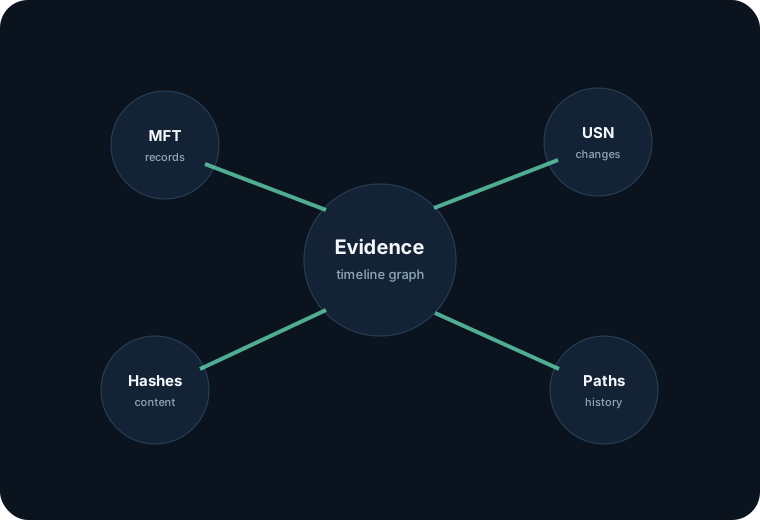
<section class="hdt-section"><div class="hdt-container"><div class="hdt-feature-wide"><div class="hdt-feature-copy"><span class="hdt-eyebrow">Evidence graph</span><h3>Correlate records without flattening away their origin.</h3><p>Keep enough raw identity to inspect a file in context while still offering fast global search.</p><ul class="hdt-checks"><li>MFT record and sequence identity</li><li>Parent record relation</li><li>USN change context</li><li>Hash and duplicate clusters</li><li>Volume and offline provenance</li></ul></div><img src="/svg/forensics-map.svg" alt="Forensics map"></div></div></section>

</div>


<div id="p91004-block-4" class="hdt-row-block">
<section class="hdt-section"><div class="hdt-container"><div class="hdt-section-head"><span class="hdt-eyebrow">Investigation views</span><h2>From one file to the surrounding timeline.</h2></div><div class="hdt-grid-3"><article class="hdt-card"><div class="hdt-card-icon">#</div><h3>Record inspector</h3><p>Expose identifiers, sequence values, allocated state and raw attribute summaries.</p></article><article class="hdt-card"><div class="hdt-card-icon">↳</div><h3>Parent chain</h3><p>Walk from a record to its root and compare current versus historical location.</p></article><article class="hdt-card"><div class="hdt-card-icon">Δ</div><h3>Change stream</h3><p>Project rename, create, delete and metadata changes into a readable timeline.</p></article><article class="hdt-card"><div class="hdt-card-icon">H</div><h3>Hash relationships</h3><p>See exact content matches across directories, disks and offline archives.</p></article><article class="hdt-card"><div class="hdt-card-icon">T</div><h3>Timestamp comparison</h3><p>Bring filesystem timestamps together without hiding their different semantics.</p></article><article class="hdt-card"><div class="hdt-card-icon">V</div><h3>Volume provenance</h3><p>Keep each result tied to the volume and capture state from which it originated.</p></article></div></div></section>

</div>


<div id="p91004-block-5" class="hdt-row-block">
<section class="hdt-section"><div class="hdt-container"><div class="hdt-callout"><strong>Concept boundary:</strong> this test page demonstrates information architecture and WebFarm rendering. It is not claiming an evidentiary chain-of-custody workflow yet.</div></div></section>

</div>


<div id="p91004-block-6" class="hdt-row-block">
<footer class="hdt-footer"><div class="hdt-container hdt-footer-grid"><div><a class="hdt-brand" href="/"><img src="/svg/logo-mark.svg" alt=""><span>Harddisk.Tools</span></a><p class="hdt-small">A database-driven concept site rendered by the Harddisk.Tools WebFarm runtime.</p></div><div><h4>Product</h4><a href="/features">Features</a><a href="/technology">Architecture</a><a href="/benchmarks">Benchmarks</a></div><div><h4>Research</h4><a href="/forensics">NTFS &amp; forensics</a><a href="/docs">Documentation</a><a href="/docs#query">Query language</a></div><div><h4>Company</h4><a href="/about">About</a><a href="/about#roadmap">Roadmap</a><a href="/404">404 test</a></div></div></footer>

</div>


<div id="p91004-block-7" class="hdt-row-block">
<div class="hdt-toast" aria-live="polite"></div>

</div>


<div id="p91004-db-actions" class="hdt-container hdt-section-tight">
<div class="hdt-small">DB row navigation test:</div>

<div id="p91004-action-920046" class="hdt-btn hdt-btn-secondary" onclick="location.href=&#39;/&#39;" style="display:inline-flex;cursor:pointer;">
Home row

</div>


<div id="p91004-action-920047" class="hdt-btn hdt-btn-secondary" onclick="location.href=&#39;/docs&#39;" style="display:inline-flex;cursor:pointer;">
Docs row

</div>


</div>


</div>

    </body>
</html>